Sunday, 31 March 2013

Arrays in JAVA

Leave a Comment
An array is a very common type of data structure where in all elements must be of the same data type.Once defined , the size of an array is fixed and cannot increase to accommodate more elements.

x[0]=0;
x[1]=1;
x[2]=2;
x[3]=3;
x[4]=4;
x[5]=5;
Using and array in your program is a 3 step process -
1) Declaring your Array
2) Constructing your Array
3) Initializing your Array Syntax for Declaring Array Variables is
int intArray[];
 // Defines that intArray is an ARRAY variable which will store integer values
int []intArray;

Constructing an Array
intArray = new int[10]; // Defines that intArray will store 10 integer values
Declaration and Construction combined
int intArray[] = new int[10];
Initializing an Array
intArray[0]=1; // Assigns an integer value 1 to the first element 0 of the array
 
intArray[1]=2; // Assigns an integer value 2 to the second element 1 of the array

Declaring and Initializing an Array
int intArray[] = {1, 2, 3, 4};
// Initilializes an integer array of length 4 where the first element is 1 , second element is 2 and so on.


Multidimensional Array To declare a multidimensional array variable, specify each additional index using another set of square brackets.
int twoD[ ][ ] = new int[4][5] ;


When you allocate memory for a multidimensional array, you need only specify the memory for the first (leftmost) dimension. You can allocate the remaining dimensions separately. In Java the length of each array in a multidimensional array is under your control.
int twoD[][] = new int[4][];
 
twoD[0] = new int[5];
 
twoD[1] = new int[6];
 
twoD[2] = new int[7];
 
twoD[3] = new int[8];


Read More...

Faces behind popular Programming Languages

Leave a Comment

1. Java (James Gosling)
image


2. C (Ken Thompson Left & Dennis Ritchie Right)
image
image

3. C++ (Bjarne Stroustrup)
image

4. Python (Guido van Rossum )
image

5. Fortran (John W. Backus)
image

6. Linux Kernel (Linus Benedict Torvalds)
image

7. Perl (Larry Wall)

image

8. C# (Development team led by Anders Hejlsberg)
image

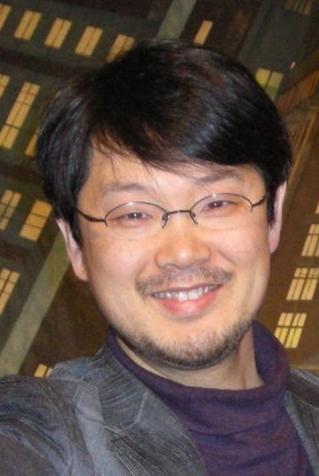
9. Ruby (Yukihiro Matsumoto)
image

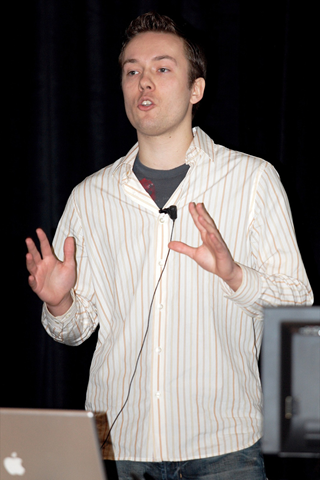
10. Ruby on Rails (RoR) (David Heinemeier Hansson)
image

11. JavaScript (Brendan Eich)
image

12. PHP (Rasmus Lerdorf)
image

Read More...

Friday, 22 March 2013

Compare Images In Java

Leave a Comment
package defaultt;

import java.awt.image.BufferedImage;
import java.awt.image.DataBuffer;
import java.io.File;

import javax.imageio.ImageIO;

public class CompareImage {
 public static boolean compareImage(File fileA, File fileB) {        
     try {
         // take buffer data from botm image files //
         BufferedImage biA = ImageIO.read(fileA);
         DataBuffer dbA = biA.getData().getDataBuffer();
         int sizeA = dbA.getSize();                      
         BufferedImage biB = ImageIO.read(fileB);
         DataBuffer dbB = biB.getData().getDataBuffer();
         int sizeB = dbB.getSize();
         // compare data-buffer objects //
         if(sizeA == sizeB) {
             for(int i=0; i<sizeA; i++) { 
                 if(dbA.getElem(i) != dbB.getElem(i)) {
                     return false;
                 }
             }
             return true;
         }
         else {
             return false;
         }
     } 
     catch (Exception e) { 
         System.out.println("Failed to compare image files ...");
         return  false;
     }
 }
 
 public static void main(String[] args) {
  File a = new File("F:\\uu.jpg");
  File b = new File("F:\\uu.jpg");
  boolean flag = compareImage(a, b);
  
  System.out.println("Match: "+flag);
 }
}

Read More...